
Poodll AI Data Map
This is a guide to Poodll’s AI services, notably how they process student data, by region and by plugin. It is designed to help you configure Poodll to be compliant with the data policies and regulations that apply in your organisation.
1. About this guide
Section titled “1. About this guide”Schools ask three main things about Poodll and AI:
- Service Providers. What AI services does Poodll use? And who provides them?
- Location. Where is student data processed?
- Training. Is student data used to train anyone’s AI models?
This guide answers those questions.
Key ideas
Section titled “Key ideas”- Your region. Every Poodll plugin has an AWS Region setting (Frankfurt, Dublin, Tokyo, Sydney and so on). Recordings and transcripts are stored in that region. Poodll chooses AI providers with endpoints (i.e. servers) appropriate for that region. Each Poodll plugin is independent of the others. So the region needs to be set in each plugin.
- The student data we process. Audio and video recordings, speech transcripts and student submitted text. Student names, emails, grades or other personal data are not submitted.
- Data retention. After processing, Poodll stores only recordings and transcripts. Each plugin has a default Days to keep file setting. After this time those recordings and transcripts are deleted from storage. Not all recordings are stored or transcribed.
- Local AI. Since Moodle 4.5, Moodle has its own AI settings (Site administration > General > AI). Some Poodll features can use the AI provider you set up there instead of ours. That could be a provider in your country, or a model you host yourself. The information tables below call this Local.
The AI services Poodll uses
Section titled “The AI services Poodll uses”| Kind of AI | What it does | Does it process student data? |
|---|---|---|
| TTS (text to speech) | Computer voices that read lesson text aloud | No. It reads lesson text written by the teacher |
| STT (speech to text) | Writes down what a student said, and scores pronunciation | Yes, the student’s voice |
| Audio Chat | A live spoken conversation between the student and an AI | Yes, the student’s voice and the conversation |
| AI Evaluation | Marks a student’s speaking or writing and gives feedback | Yes, the student’s words, as text |
| Image Generation | Makes pictures for lessons | No. It uses the teacher’s description |
| Text Content Generation | Writes lesson content: passages, questions, definitions, translations | No. It uses teacher provided prompts, not student data. |
2. AI Services, regions and plugins
Section titled “2. AI Services, regions and plugins”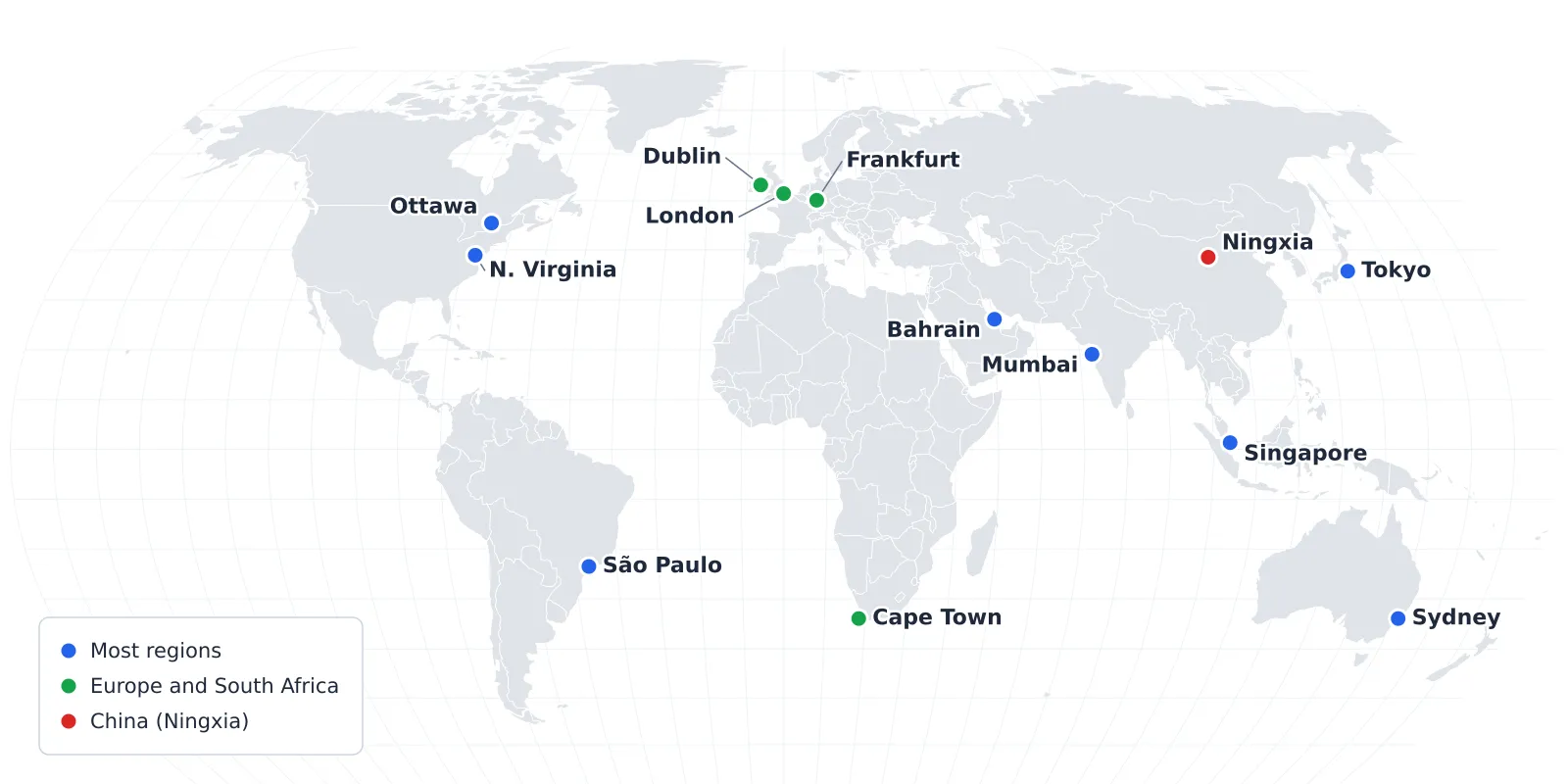
Table 1: AI usage by plugin
Section titled “Table 1: AI usage by plugin”| Package | Plugin | TTS | STT | Audio Chat | AI Evaluation | Image Generation | Text Content Generation |
|---|---|---|---|---|---|---|---|
| Poodll Media | Cloud Poodll Assignment (submission) | — | ✅ | — | — | — | — |
| Cloud Poodll Feedback | — | ✅ | — | ✅ | — | — | |
| Cloud Poodll Question | — | ✅ | — | — | — | — | |
| Tiny Poodll | — | ✅ | — | — | — | — | |
| Poodll Filter | ✅ | — | — | — | — | — | |
| Poodll Languages | ReadAloud | ✅ | ✅ | — | ✅ | — | ✅ |
| Solo | ✅ | ✅ | — | ✅ | — | ✅ | |
| WordCards | ✅ | ✅ | — | — | ✅ | ✅ | |
| MiniLesson | ✅ | ✅ | ✅ | ✅ | ✅ | ✅ |
Table 2: AI providers by region
Section titled “Table 2: AI providers by region”| Region | TTS | STT | Audio Chat | AI Evaluation | Image Generation | Text Content Generation |
|---|---|---|---|---|---|---|
| Most regions US East, Ottawa, São Paulo, Tokyo, Singapore, Sydney, Mumbai, Bahrain¹ | AWS(US) Google(US) Azure(US) LemonFox(US) OpenAI(US) | AWS(your)² Poodll(your)² AssemblyAI(US) LemonFox(US) Azure(US) | Google(US) Optional: OpenAI(US)⁴ | OpenAI(US) Optional: Local³ | OpenAI(US) Google(US) Optional: Local³ | OpenAI(US) Optional: Local³ |
| Europe and South Africa Dublin, London, Frankfurt, Cape Town | AWS(US) Google(US) Azure(US) LemonFox(US) OpenAI(US) | AWS(your)² Poodll(your)² AssemblyAI(EU) LemonFox(EU) Azure(EU) | Google(US) Optional: OpenAI(EU)⁴ | OpenAI(EU) Optional: Local³ | OpenAI(EU) Optional: Local³ | OpenAI(EU) Optional: Local³ |
| China Ningxia | AWS(China) | AWS(China) Poodll(China) | Not available | DeepSeek(China) Optional: Local³ | AWS(China) Optional: Local³ | DeepSeek(China) Optional: Local³ |
- Bahrain cannot be reached at the time of writing (19 November 2026), after damage in the Iran–US conflict.
- Your means “Your Region” the AWS region chosen in the plugin’s settings. Poodll STT and AWS STT run in ‘your region.’
- Local means one of the AI providers registered in your Moodle site. Only some features can use it.
- Audio Chat. To use OpenAI you must provide your own OpenAI API key, and pay charges. Poodll’s Europe region OpenAI will only work with a key from an OpenAI project whose data residency is set to Europe.
3. Student data and AI training
Section titled “3. Student data and AI training”In most cases your student data will not be used for training. But you may need to disable browser STT.
| Provider | Used for training? | Their policy |
|---|---|---|
| Amazon Web Services | No. Poodll has opted out for all AWS AI services | AWS opt-out policy |
| Poodll’s own speech engine | No. | n/a |
| AssemblyAI | No. EU servers are never used for training, and Poodll has opted out for the US servers | Data retention and training |
| LemonFox | No. Policy states “All data is deleted immediately after processing.” Inference only. | Privacy |
| OpenAI | No. API data is not used for training. It is kept for up to 30 days for abuse checks, then deleted. For Dublin, London, Frankfurt and Cape Town that copy is also kept in the EU | Your data |
| Google (Gemini) | No. On commercial plans Google does not use prompts or responses to improve its products | Gemini API terms |
| Google Cloud | No. TTS only. | Google Cloud privacy notice |
| Microsoft Azure Speech | No. Audio is scored in memory and not stored | Speech to text data and privacy |
| DeepSeek (China) | Yes. Their policy allows training use | Privacy policy |
| Local (your provider) | Provider dependent. Check the settings and terms of your agreement with them. | n/a |
| Browser STT | Probably. Turn it off if necessary. (see below) | n/a |
Browser STT
Section titled “Browser STT”Poodll activities that deliver instant transcription may use the speech recognition built into the student’s browser. In Chrome the audio goes to Google, in Safari to Apple, and in Edge to Microsoft under their consumer terms. Poodll has no service agreement to cover browser STT and cannot configure a region or data usage terms. To be sure that student data is not used to train AI models, browser STT should be disabled in the Poodll plugins that use it. This will make transcription slower in some cases and may affect the quality of the transcription (for better or for worse).
| Plugin | Turning off browser STT |
|---|---|
| ReadAloud | The practice step can use browser STT. To disable it, in the plugin’s admin settings set “Open STT realtime” to “3rd party” (not Auto). Alternatively choose “Guided STT (Poodll)” as the “Practice step transcriber”. |
| Solo | To disable browser STT, in the plugin’s admin settings set “Streaming recorder by default” to “No, use the standard recorder” or “Yes, use cloud recognition”. |
| WordCards | The speechcards item can use browser STT. Set “Transcriber” to “Guided STT (Poodll)” to use Poodll STT instead. Alternatively do not use speechcards. |
| MiniLesson | To disable browser STT in the MiniLesson items that use it, in the plugin’s General Settings admin page, check “Enable Alternate streaming”. |
4. More plugin details
Section titled “4. More plugin details”Table 3: Details for each plugin
Section titled “Table 3: Details for each plugin”| Plugin | What else you should know |
|---|---|
| Cloud Poodll Assignment Submission | Recordings are stored in your region. Speech to text is used if Enable Transcription is on, to make a transcript of the student’s recording. Switch it off and no AI is used |
| Cloud Poodll Assignment Feedback | Speech to text is used if transcription is enabled. AI Evaluation is used only when the teacher uses corrections feedback and clicks the AI corrections buttons. |
| Cloud Poodll Question | Speech to text is used if transcription is enabled. Switch it off and no AI is used |
| Tiny Poodll | Uses speech to text to make subtitles for recordings. Subtitles are optional and can be switched off |
| Poodll Filter | Some widgets can use TTS to read page text aloud. |
| ReadAloud | The Read and Practice steps use speech to text. Word-by-word comparisons with the passage are done on your Moodle server, and no generative AI is used. AI content generation is available for teachers to create reading passages. |
| Solo | AI Evaluation gives an AI grade, feedback, grammar correction and a level estimate. It is switched on or off with the activity’s Enable AI setting. With it off, Solo still records, transcribes and counts words but there is no automated evaluation. |
| WordCards | Speechcards practice activity uses speech to text. Image and text generation are teacher tools that make pictures, definitions and translations from the word list. No student data is sent. Translation and pictures can use Local AI. |
| MiniLesson | Each lesson can contain different items, and the AI used depends on the item type. Image and text generation for building lessons and items are teacher tools. Any item type can be switched off for the whole site in Manage Lesson Items. Per item details are in the table below. |
Table 4: MiniLesson, item by item
Section titled “Table 4: MiniLesson, item by item”Each item has its own AI usage profile, and some items do not use AI at all.
| Item | Student data sent? | AI used | What else you should know |
|---|---|---|---|
| Audio Chat | Yes. Audio and text transcript | Audio Chat, AI Evaluation | The conversation runs on Google Gemini by default, which gives no region choice. To keep it in Europe you need to provide an OpenAI API key. Create a project in your own OpenAI account with Europe as its data residency, make an API key in it, enter it as the OpenAI Key under MiniLesson’s Other API Keys (BYOK), and set the item’s Provider to OpenAI. OpenAI then bills you directly. The data residency of the project that generates the key must be Europe. |
| Cards | No | TTS | Vocabulary cards with definitions and images. |
| Dictation | No. | TTS | Listen and type out the sentences. |
| Dictation Chat | No. | TTS | Listen and type the missing words. |
| Fiction | No | TTS | An interactive story. Story text can be read aloud and translated |
| Fluency | Yes. Audio. | STT | Pronunciation scoring with STT by Microsoft Azure: West Europe for Dublin, London, Frankfurt and Cape Town, US East for most other regions. The Transcriber setting does not change this. |
| Free Speaking | Yes. Audio and text transcript | STT, AI Evaluation | Marks a spoken answer and gives feedback. AI Evaluation can use Local AI: in AI Manager, set Grade student submission to an AI provider set up in Moodle |
| Free Writing | Yes. The student’s writing | AI Evaluation | Marks a written answer and gives feedback. Can use Local AI, as for Free Speaking |
| H5P | No | None | Runs an H5P activity. |
| Listen and Repeat | Yes. Audio | TTS, STT | The student’s words are checked against the expected words. No generative AI |
| Listening Gap Fill | No | TTS | Listen and type the missing words. |
| MC Audio (Multi Choice Audio) | Yes. Audio | TTS, STT | Multi choice question where the student speaks the answer. Checked against the expected words. No generative AI |
| Multichoice | No | TTS | Multichoice question |
| Multichoice Quiz | No | TTS | Multiple multichoice questions |
| Page | No | TTS | A content page which is not graded. |
| Passage Gap Fill | No | TTS | Listen and type the missing words. |
| Passage Reading | Yes. Audio | STT | The student reads a passage aloud and is scored by comparing words, as in ReadAloud. No generative AI |
| Scatter | No | TTS | Match the cards. |
| Self Check | No | TTS | The student records, listens back and judges their own attempt. No speech recognition |
| Shadow | No | TTS | The student speaks along with a YouTube clip. No recording and no speech recognition |
| Short Answer | Yes. Audio | TTS, STT | Checked against the expected answers. No generative AI |
| Slides | No | TTS | Slideshow presentation. |
| Smart Frame | No | None | Shows an html page/widget uploaded by the teacher. |
| Space Game | No | TTS | Matching activity that works as a shooter game. |
| Speaking Gap Fill | Yes. Audio | TTS, STT | Checked against the expected words. No generative AI |
| Speech Cards | Yes. Audio | TTS, STT | Checked against the expected words. No generative AI |
| Speed Reading | No | None | Timed reading and comprehension check |
| Typing Gap Fill | No | TTS | Fill in the blanks type activity |
| Word Cards | No | TTS | Vocabulary practice activities |
| Word Shuffle | No | TTS | Arrange the words in the correct order |