
7. Practical Teaching Ideas with Poodll Languages
The Poodll Languages activities can be used individually or combined into a unit of study. This section introduces six ways of using them, which can be adapted for different languages and levels.
The available options depend on which plugins and features your Moodle administrator has enabled.
7.1 A Vocabulary Programme Across a Course
Section titled “7.1 A Vocabulary Programme Across a Course”Learning goal: Help students learn a set of words and retain them over time.
Recommended tool: A series of Poodll WordCards activities.
Rather than one long list, introduce a small set of words in each unit. Words from earlier units come back in the review steps, so students keep practising them.
Set up the activity
Section titled “Set up the activity”- Divide your word list into sets of about 8 to 12 words.
- Add a WordCards activity to each unit and set the Target Language.
- Use the Word Wizard to add each set of words.
- In Steps Mode Options, use new words for the early steps and a (Review) activity for the last step. In the first unit, set review steps to None.
- Set Mode to Steps mode then Free mode, so that students can continue practising.
- Check Reports → Terms Learned in course regularly.
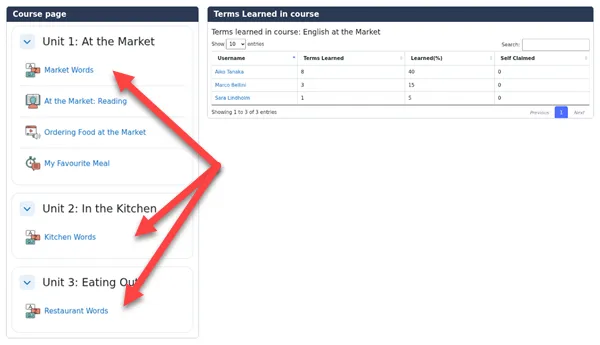
Example task: Complete this week’s WordCards before Friday. Use Free mode to practise any words you have not yet learned.
Teaching tip: Use the course-level report to see which students are falling behind on vocabulary, then give them extra practice or time in class.
7.2 A Complete Unit: Vocabulary, Reading, Speaking
Section titled “7.2 A Complete Unit: Vocabulary, Reading, Speaking”Learning goal: Build from receptive to productive use of language on one topic.
Recommended tool: WordCards, ReadAloud and Solo together.
Set up the activity
Section titled “Set up the activity”- Add a WordCards activity with the unit’s key vocabulary.
- Add a ReadAloud whose passage uses those words. Use Show AI text utils to draft or simplify the passage, then review it.
- Add a Solo activity on a related topic and enter the unit’s words as Target Words, so that students earn bonus points for using them.
- Use Moodle’s Restrict access and activity completion to release each activity when the previous one is complete, if you want students to follow the order.
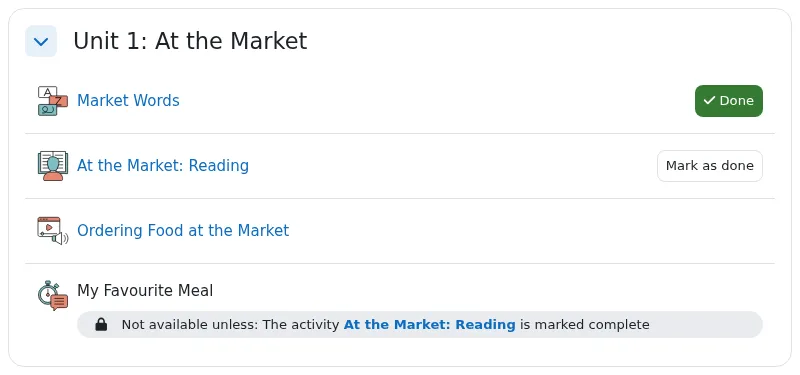
Example task: Learn the food words in WordCards, read “At the Market” aloud in ReadAloud, then record yourself in Solo describing your favourite meal using at least five of the new words.
Teaching tip: Target words let you connect the speaking task directly to the vocabulary studied, and give students a clear goal.
7.3 Tracking Reading Fluency Over Time
Section titled “7.3 Tracking Reading Fluency Over Time”Learning goal: Measure and improve students’ reading speed and accuracy over a term.
Recommended tool: A series of Poodll ReadAloud activities.
Set up the activity
Section titled “Set up the activity”- Create a ReadAloud activity for each checkpoint, using passages of a similar level and length.
- Use the same Time limit and Target WPM for each one so that results are comparable.
- Consider unchecking Can exit early and using Strict grade calculation for checkpoints.
- For checkpoints, you could turn off the Listen and Practice steps. For practice sessions, leave them on.
- Export the results from the Reports tab to compare them. Passage Key, under Recording and AI options, adds a tag to some exported reports, which can help when working in a spreadsheet.
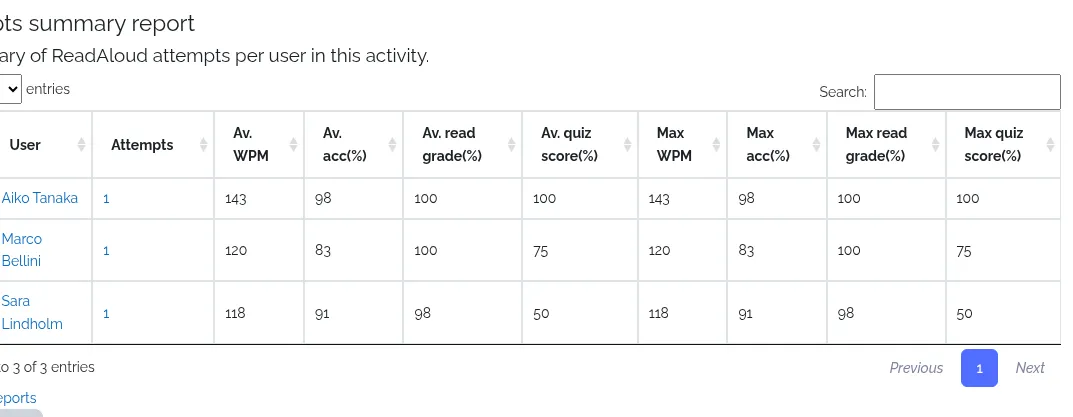
Example task: Read the passage aloud for one minute. Your teacher will use your result to track your progress this term.
Teaching tip: Share progress with students rather than ranking them. Improving on their own previous score is often more motivating and meaningful.
7.4 Regular Speaking Practice with Instant Feedback
Section titled “7.4 Regular Speaking Practice with Instant Feedback”Learning goal: Give students frequent speaking practice without increasing teacher marking.
Recommended tool: Poodll Solo.
Regular low-stakes speaking can build confidence. Students receive immediate statistics and suggested corrections, and you can spot-check their work.
Set up the activity
Section titled “Set up the activity”- Add a Solo activity with a clear Speaking Topic and a picture or short clip as a prompt.
- Set a modest Target Time and a realistic Total Words Goal.
- Turn on Allow Multiple Attempts, so that students can use the feedback to try again.
- Set AI Feedback Instructions to suit the class, such as Comment on past-tense verbs only and encourage the student.
- Use the AI Grade Tester to check that the feedback is suitable.
- Listen to a sample of attempts. With several Solo activities in a course, the Class Progress report compares class averages across them.
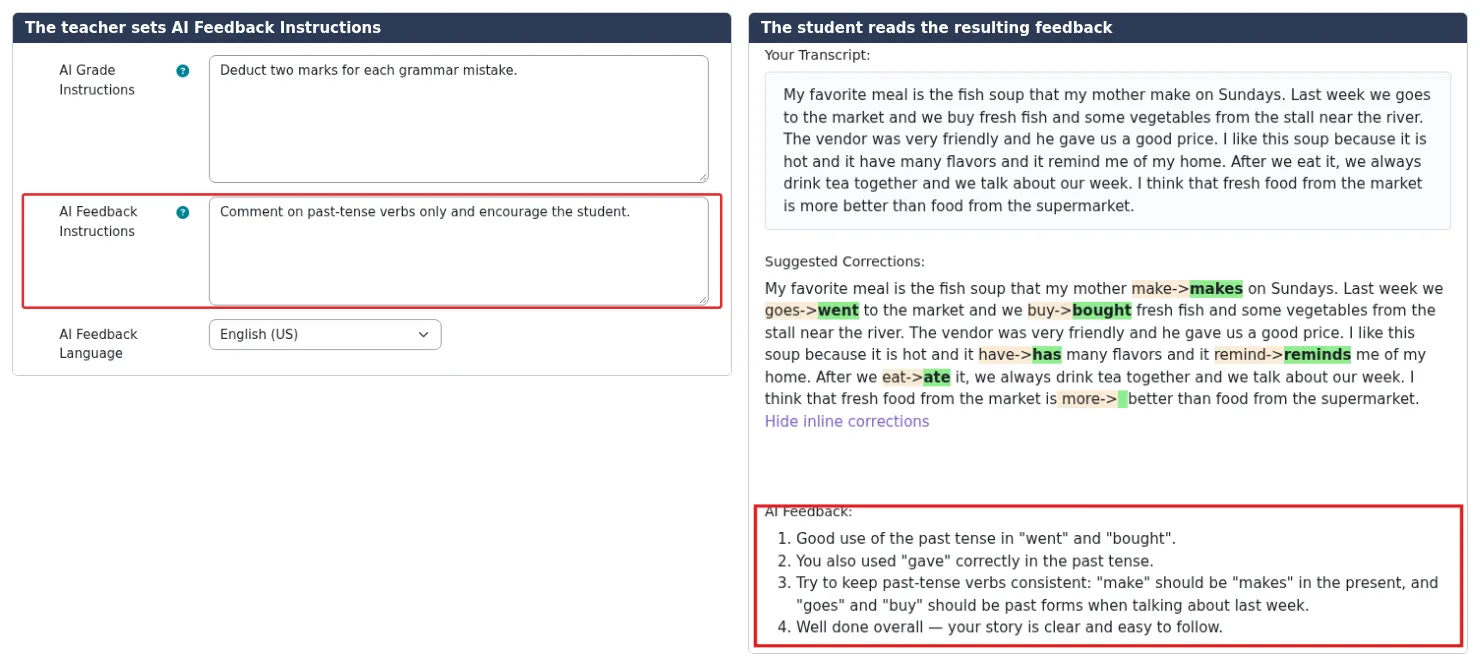
Example task: Look at the picture. Describe what happened yesterday. Speak for at least one minute and use the past tense. Check your corrections, then try again.
Teaching tip: Ask students to note one correction they will focus on in their next attempt. This encourages them to act on the feedback.
7.5 Homework Lessons Made Quickly with AI
Section titled “7.5 Homework Lessons Made Quickly with AI”Learning goal: Provide varied, skill-focused homework for a specific class with little preparation.
Recommended tool: Poodll MiniLesson with AI Generate.
Set up the activity
Section titled “Set up the activity”- Add a MiniLesson and set Target/Voice Language and Learner’s Native Language.
- On the AI Generate tab, choose a template such as a Word Practice template or a Grammar Lesson template.
- Enter the words or grammar point from your current class lesson, and the students’ level.
- When generation completes, review each item on the Lesson Items tab and edit where necessary.
- Preview the lesson as a student and adjust Max. Attempts if you wish.
- Check the Grade Report before your next class.
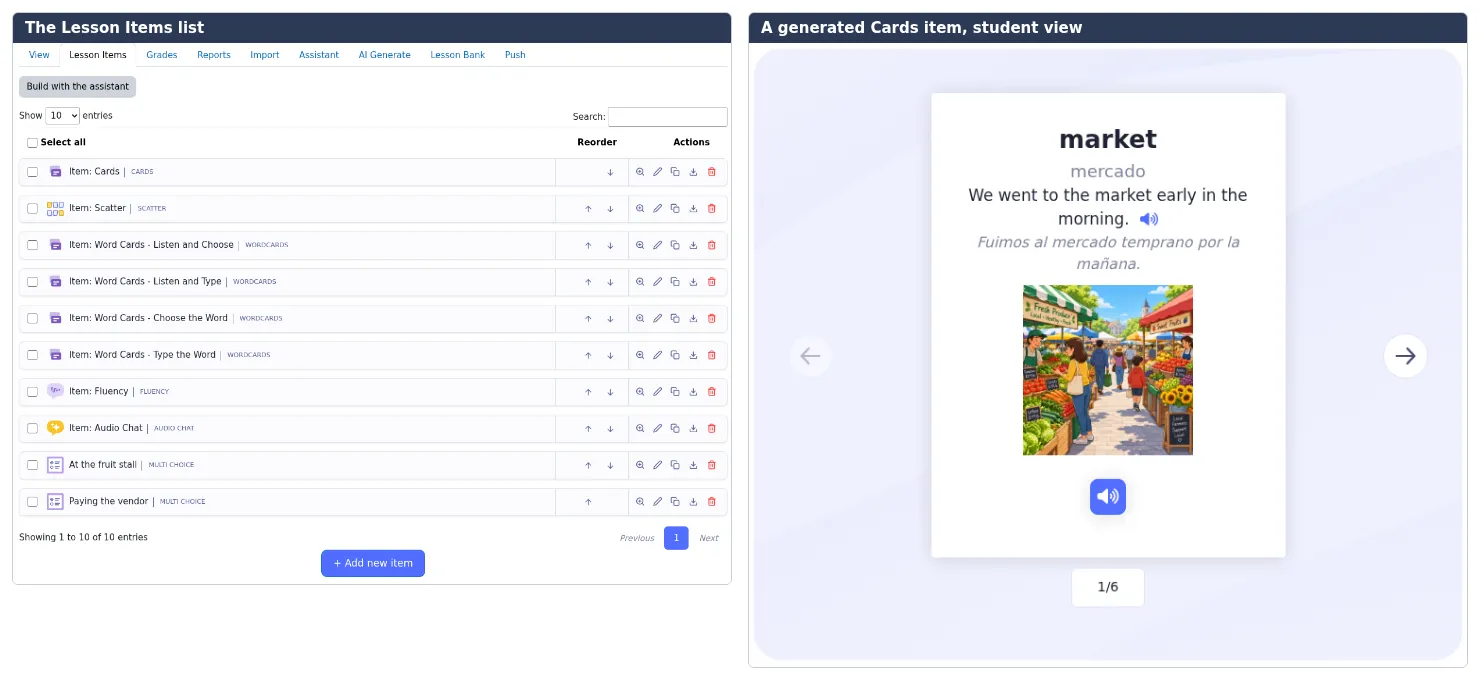
Example task: Complete this ten-minute lesson on the words from today’s class. Try again if your score is below four stars.
Teaching tip: Run more than one template on the same lesson, as templates add to the lesson. For example, follow a vocabulary template with a free speaking task.
7.6 Conversation and Pronunciation Practice
Section titled “7.6 Conversation and Pronunciation Practice”Learning goal: Give students private speaking practice that they might avoid in class.
Recommended tool: MiniLesson with Listen and Speak, Fluency, Self Check, Video Shadowing or Audio Chat items.
Set up the activity
Section titled “Set up the activity”- Add a MiniLesson and set the target language.
- Start with Listen and Speak or Fluency items that use the unit’s useful phrases.
- Add a Video Shadowing item if a suitable YouTube clip is available.
- Finish with an Audio Chat item on the same topic. Students then use the language in a conversation with an AI partner.
- If your target language has limited speech recognition support, use Self Check items instead. They compare a student’s recording with a model rather than using recognition.
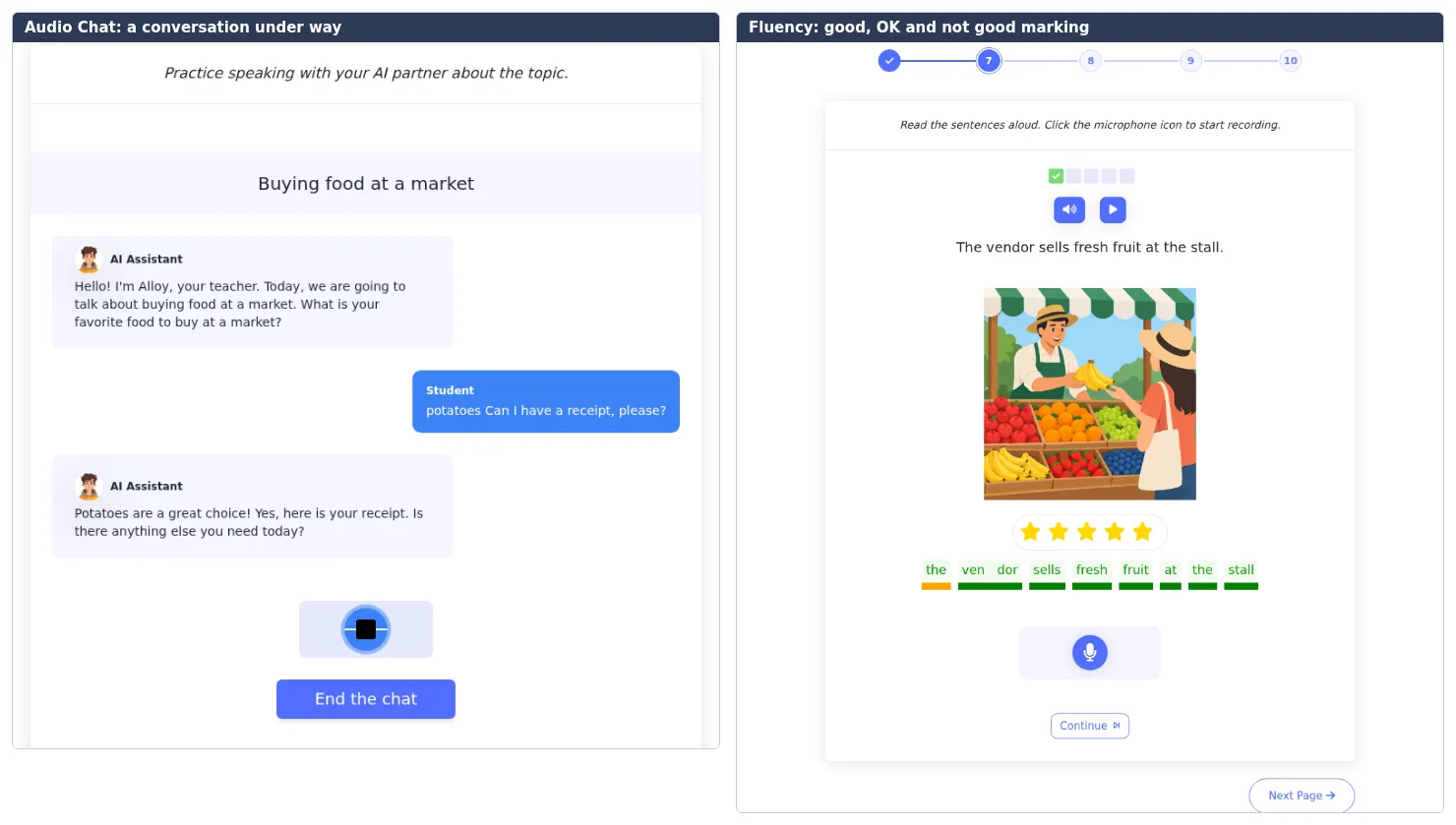
Example task: Practise ordering food with the Listen and Speak cards, then have a conversation with the AI waiter. Try to use at least three of the phrases you practised.
Teaching tip: Encourage students to retry. Speaking to AI may feel less intimidating than speaking in class, which makes it good preparation for later pair work.
7.7 Choosing the Right Activity
Section titled “7.7 Choosing the Right Activity”| Teaching activity | Recommended activity | Feature to use |
|---|---|---|
| Long-term vocabulary learning | WordCards | Review steps and Terms Learned reports |
| Unit combining several skills | WordCards, ReadAloud and Solo | Target Words and activity completion |
| Tracking reading fluency | ReadAloud | Target WPM and reports |
| Frequent speaking practice | Solo | Multiple attempts and AI feedback |
| Quick homework | MiniLesson | AI Generate |
| Listen-and-repeat pronunciation | MiniLesson | Listen and Speak, Fluency or Self Check |
| AI conversation | MiniLesson | Audio Chat |
| Short writing with feedback | Solo or MiniLesson | Typed sequence or Free Writing |
Teachers can begin with a single activity and add others as they and their students become comfortable with the tools.